


AI Video&Photo&AI Kiss-VidNex
4.45.00 Reviews
App Specs
- Version
- 1.0.9
- Updated On
- License
- Free
- Downloads
- 10,000+
- Developer
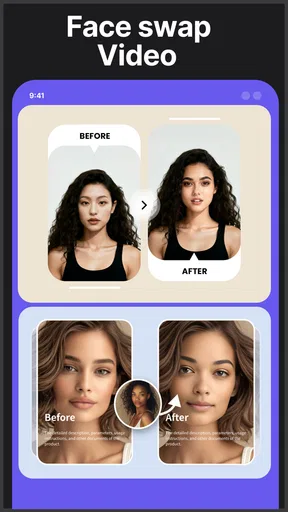
- Face swap video
- Categories
- Photography
- Platform
- Android
Screenshots
 Analysis by AppCompare
I tried AI Video&Photo&AI Kiss-VidNex as a photography app for turning still images and ideas into short AI-assisted visual content. Its focus is broader than a conventional camera editor: it brings together image-to-video creation, text-to-video generation, AI image making, and face-swap video work in one place. That combination makes it interesting for quick experiments, social posts, playful edits, and anyone who would rather describe an idea than build an effect manually.
My first impression is that this is an app built around immediacy. You start with an image, a text idea, or a face-swap concept instead of spending time learning a full desktop editor. That is its main appeal, but it also shapes its limitations. I would not treat it as a replacement for a professional video suite. I see it more as a fast creative tool for people who want to test visual ideas on a phone and decide quickly whether a result is worth sharing.
What the app actually offers in daily use
The app comes from the developer Face swap video and sits in the Photography category. It is free to install, with optional in-app purchases ranging from $5.99 to $199.99 per item. That distinction matters: you can begin without paying, but the most valuable part of the experience may depend on how much access the free version gives you during your own use. I would approach it as a free starting point rather than automatically assuming that every creative option is included at no cost.
The store summary points to four connected activities: making an image move, generating video from text, creating AI images, and producing face-swap videos. In practice, that gives the app a useful creative loop. I can begin with a photograph, try to animate it, generate a different visual from a written prompt, and then explore a face-based video idea. The app is most appealing when I want to move between those stages without opening several separate applications.
The short description, “AI Video&Photo,” is brief, but the broader feature direction is clearer when I look at the whole product. This is not simply a filter collection or a traditional photo retoucher. Its purpose is generative and transformative: the source material is only the starting point, while the app attempts to create a new visual result from it.
The current version is 1.0.9, and the app works on Android 7.0 and later. That makes it accessible to many older Android phones, although compatibility alone does not guarantee an equally smooth experience on every device. AI image and video processing can feel more demanding than ordinary cropping or color adjustment, so I would keep expectations realistic if the phone is older or has limited free storage.
Starting with a photo instead of a blank prompt
The image-to-video direction is the most approachable entry point for many people. A still photograph already gives the app visual information, so the creative task becomes choosing an image and deciding what kind of movement or transformation you want. This is easier than writing a detailed description from nothing, especially when you are making a first attempt.
Worth Reading Before You Choose

Flipboard Shows What News Apps Must Do Beyond the Feed

Switching to Android Auto Means Rethinking Your Driving Routine

Google Calendar Makes a Crowded Week Easier to Manage

Ludo King Makes the Most of the Minutes Between Plans

Baby Panda World Brings Quick Play to Modern Phones, but Its Game Library Feels Busy

ESPN’s Live Game View Makes Following Close Games Easier
A useful workflow is to begin with a clear subject and a simple composition. A portrait with the face unobstructed, a single person in the frame, or an object separated from a busy background gives the system less visual ambiguity to interpret. I would avoid starting with a crowded group photograph if the goal is a convincing face-related result. The more faces and overlapping details there are, the harder it becomes to judge whether the output is genuinely usable or merely amusing.
One non-obvious advantage of this workflow is that a single photograph can serve as a test image across several creative modes. Instead of immediately using a favorite personal picture, I would first choose a harmless sample image and learn how the app handles motion, facial detail, and composition. That small precaution saves time and helps separate a problem with the source image from a problem with the generation idea.
Using text to guide a visual idea
Text-to-video creation is attractive when I have a concept but no suitable footage. It can be useful for a quick visual sketch, a mood clip, or an imaginative scene that would be difficult to record. However, I would write prompts in stages rather than trying to describe everything at once. Start with the subject and setting, then add the intended action, and only after that refine the atmosphere or style.
This step-by-step approach is more practical than writing an elaborate paragraph. If the result misses the point, I can identify which part needs changing. Was the subject unclear? Was the action too complicated? Did the setting compete with the main idea? Treating each generation as a small experiment makes the app feel less random and makes the free access more valuable because I am learning from each attempt instead of repeatedly submitting vague requests.
I would also keep text-based expectations modest. A generated clip can be useful as a creative starting point without being ready for a polished campaign, client presentation, or important announcement. If exact identity, precise movement, readable text, or continuity across several moments is essential, a conventional editor using real footage is usually the safer choice.
Why the face-swap option needs extra care
Face-swap video is likely to be the most immediately shareable part of the app, particularly for jokes between friends or playful themed clips. It can turn a familiar image into something surprising, and the result may be entertaining even when it is not perfectly realistic. That said, this is also the feature where consent matters most.
I would only use faces belonging to people who have clearly agreed to the edit, and I would avoid presenting a generated clip as if it were authentic footage. A private joke is one thing; posting a manipulated video of someone without permission is another. The app’s creative convenience does not remove the responsibility attached to using another person’s likeness.
For better results, I would select a source face with even lighting, a straightforward expression, and a forward-facing angle. A dramatic side profile, sunglasses, heavy shadows, or hair covering important facial features can make the transformation less convincing. This is a practical trade-off: the more unusual the source image, the more entertaining the experiment may be, but the less predictable the final result becomes.
Another useful habit is to keep the original photograph separate from the generated output. That makes it easier to compare the transformation, reuse the source in another project, and avoid accidentally treating the altered version as the only copy. It is a simple organization step, but it becomes important once several variations begin to accumulate.
Creating AI images before turning them into video
The AI image function gives the app a second route into video creation. I can first develop a still visual, inspect whether the composition looks right, and only then attempt to animate it. I prefer this staged process because it prevents me from spending effort on a video idea built on an image that already has the wrong subject, framing, or mood.
This also creates a practical way to make visual concepts for posts when I do not have new photography available. For example, I might create a fictional scene for a short announcement, a stylized background for a social post, or an imaginative image to accompany a personal idea. The strength here is speed and experimentation, not precise art direction.
When an AI image looks almost right but not quite, I would resist trying to fix everything through repeated generation. Sometimes the better decision is to change the concept, simplify the prompt, or start with a different source image. That is one of the trade-offs of an all-in-one generative app: convenience encourages iteration, but iteration can become wasteful if every attempt is treated as a small correction to a fundamentally unsuitable starting point.
Cost, value, and the points where the experience changes
The clearest cost fact is simple: the app is free to install, while in-app purchases are available at prices from $5.99 to $199.99 per item. I would therefore test the free experience before spending anything. The free entry is useful for learning the interface and seeing whether the generated style suits me. Paid value only makes sense after I know which type of creation I will actually use and whether the available access fits my habits.
I would not buy a high-priced option merely because the app offers several creative modes. Variety is not the same as value. If I only want an occasional funny face-swap clip, a large purchase may be difficult to justify. If I regularly need quick concept visuals and the app’s paid access removes a restriction that genuinely interrupts my workflow, the calculation could be different. The right decision depends on repeated personal use, not on the number of tools displayed in the interface.
There is also a difference between free access and free value. Even without paying, I can learn whether image-to-video results are appealing, whether text prompts produce ideas I can use, and whether the face-swap workflow is comfortable. That trial has practical value because it prevents me from committing to a separate subscription or a more expensive editing setup before I understand what I need.
At the same time, I would keep an eye on how quickly I use any available generation opportunities. AI creation often encourages a “one more attempt” habit. A disciplined workflow helps: prepare the source image first, write a short prompt, review the result, and only then make a targeted revision. This approach stretches free access further and gives a clearer basis for deciding whether a purchase is worthwhile.
The app has an average rating of 4.4 from around 900 ratings, with over 10 thousand installs. Those figures suggest that it has attracted a modest audience and generally positive user response, but I would still treat them as a starting signal rather than proof that every feature will work equally well on my phone. A generative app can be enjoyable for one person’s images and disappointing for another person’s source material.
What it does better than ordinary alternatives
Compared with a standard mobile video editor, the main advantage is that I do not need to record every visual element myself. A conventional editor is better when I already have footage and want dependable trimming, captions, audio control, transitions, or exact timing. This app is better when the starting point is a still image or an idea and I want the software to do more of the visual invention.
Compared with using separate specialist apps, the benefit is reduced friction. I can move from image creation to animation or face-based experimentation without changing my entire workflow. That is especially helpful for casual creators who do not want to learn several interfaces. The compromise is depth. An all-in-one app may be faster for exploration, while dedicated tools usually offer more control in their specific area.
Compared with making a real video, AI generation is useful for concepts that are impossible, impractical, or simply too time-consuming to film. But real footage remains preferable when authenticity, accurate movement, or a person’s natural expression matters. I would choose this app for imagination and speed, not for situations where viewers need to trust that the scene happened exactly as shown.
Everyday situations where it earns a place
Imagine I want to send a birthday greeting that feels more personal than a static message. I could start with a consenting friend’s photo, create a playful transformation, and share the result privately after checking that the face and movement look respectful. The app is well suited to that kind of low-stakes, personal experiment, provided everyone involved is comfortable with the edit.
Another realistic use is planning a social post before taking the time to produce it properly. I might use text-to-video to test whether a visual idea feels lively, then decide whether the concept deserves real filming. In that role, the app acts like a sketchbook. The output does not need to be perfect; it needs to reveal whether the idea has potential.
It can also help someone who has a collection of still photographs but wants more movement. A travel image, a pet portrait, or a product arrangement may become a short visual experiment. The important distinction is that the app adds motion and interpretation rather than replacing the need for a strong source image. If the original photo is blurry, cluttered, or poorly framed, generation cannot guarantee a convincing rescue.
Where I would choose something else
I would skip this app if my main goal were detailed manual editing. Someone producing a carefully timed video with layered sound, precise titles, color correction, and repeatable transitions will probably be happier with a dedicated editor. The generative approach is not a substitute for timeline control.
I would also be cautious if I needed consistent characters or scenes across a longer project. AI-generated results can be useful as isolated clips, but a sequence that must maintain exact identity, wardrobe, layout, and movement requires a level of control that this kind of quick creative app may not provide reliably.
It is not the right choice for deceptive content, unauthorized face manipulation, or professional work where the origin and accuracy of every visual must be clear. Face-swap technology is entertaining only when used responsibly. If the intended audience could reasonably mistake the result for real footage, I would label it clearly or choose a more transparent creative method.
My verdict after weighing the free start against paid use
AI Video&Photo&AI Kiss-VidNex is worth trying if I want quick AI image and video experiments on Android, especially when I enjoy moving between text prompts, still images, and face-swap ideas. Its strongest quality is the compact workflow: I can begin with an idea or photograph and explore several directions without needing advanced editing skills.
The free installation lowers the risk of testing it, but I would not rush into the most expensive purchase. I would first make a few carefully planned creations, check whether the results are good enough for my intended audience, and decide whether I return to the app often enough to justify paying. The available purchase range makes that personal evaluation especially important.
My recommendation is positive but specific: choose it as a playful creative laboratory, a concept-making tool, or a convenient way to produce occasional short visual experiments. Choose a traditional editor when control and reliability matter more than surprise. For me, the app delivers the most value when I treat AI output as a starting point rather than a finished production, use face features only with consent, and spend money only after the free experience proves that it fits my actual routine.
It is rated for Everyone, which makes the app approachable for a broad audience, but responsible use still matters even when the age label is inclusive. The best results come from thoughtful source images, simple prompts, and realistic expectations. Used that way, this photography app can be a fun addition to a mobile creative toolkit without pretending to replace the tools built for serious, precise production.
Pros
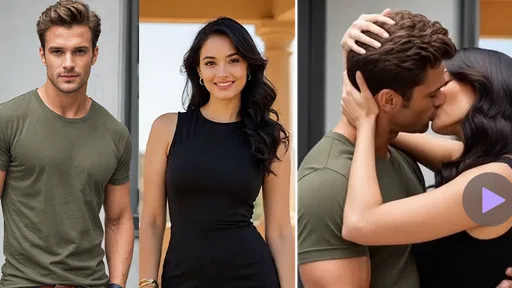
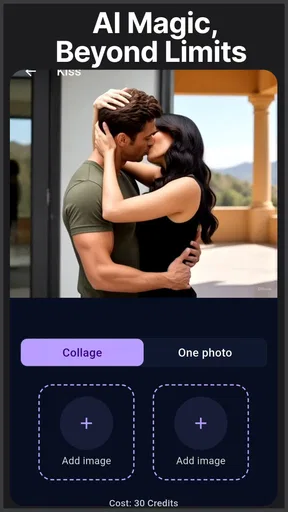
- Creates AI kiss videos and photo effects quickly.
- Simple interface suitable for casual users.
- Offers creative templates for social media content.
- Supports both photo and video-based AI effects.
- Results can be entertaining and highly shareable.
Cons
- Some features may require a subscription or in-app purchases.
- AI results can look unnatural with low-quality photos.
- Processing speed may depend on your device and connection.
- Generated content may raise privacy concerns for uploaded photos.
- Watermarks or limited exports may appear in the free version.
FAQs for AI Video&Photo&AI Kiss-VidNex
What is AI Video&Photo&AI Kiss-VidNex used for?
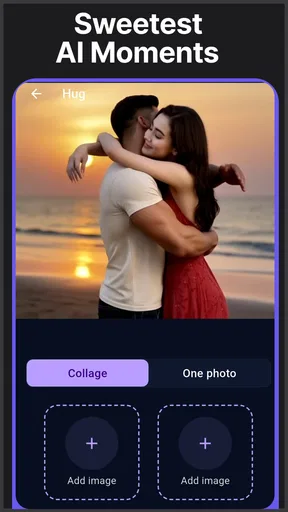
AI Video&Photo&AI Kiss-VidNex is designed for creating and editing AI-powered photos and short videos, including kiss-style animations and other creative transformations. Users can typically upload an image, choose an available effect or template, and let the app generate the result automatically. It is aimed at entertainment and social sharing rather than professional video production, so results may vary depending on the source image and selected effect.
How do I create an AI kiss video with VidNex?
After opening the app, you generally need to select a suitable photo from your device and choose the AI kiss or video effect offered in the creation tools. The app then processes the image and generates an animated result. For the best outcome, use a clear, front-facing photo with visible faces, good lighting, and minimal obstruction. Processing time can depend on image quality, internet speed, and server availability.
Is AI Video&Photo&AI Kiss-VidNex free to use?
The app may allow users to try selected effects or create limited content without payment, but some features can require credits, a subscription, or an in-app purchase. Before confirming any purchase, carefully check the pricing page, renewal terms, trial conditions, and cancellation instructions shown in the app store or inside the application. Availability of free tools and premium features may also change with future updates.
Does VidNex protect my uploaded photos and personal information?
Because AI generation commonly requires images to be uploaded for cloud processing, users should review the app’s privacy policy before submitting personal or sensitive photos. Avoid uploading images containing confidential documents, private locations, or people who have not agreed to the transformation. Check what data is collected, how long content is retained, whether images are shared with service providers, and how deletion requests are handled.
What should I do if the generated video looks unnatural or the app fails?
AI results are not always perfect, particularly when faces are partially covered, turned sideways, poorly lit, or shown in low-resolution images. If a result looks distorted, try another photo with clearer facial details and a simpler background. Restarting the app, checking your internet connection, updating the application, or trying again later may help with processing errors. If problems continue, use the app’s support option and include relevant error details.


